How to Talk to Strangers Online Safely
Your complete guide to private, secure, and worry free anonymous chatting in 2026
Thuksa Safety Team

The internet is a strange and wonderful place. You can meet your future best friend, a business partner, or someone who shares your obsession with vintage synthesizers. But let‘s be real. Talking to strangers online also comes with real risks.
I‘ve been there. You‘re bored on a Tuesday night, curious about random video chat, or looking for an anonymous space to vent. Platforms like Omegle (RIP), OmeTV, Uhmegle, Umingle, Thundr, and Ogtv promise exciting connections. But without the right precautions, you might end up with more than you bargained for. Scams, harassment, privacy leaks, or even worse.
That‘s why I wrote this guide. By the end, you‘ll know exactly how to talk to strangers online safely. You‘ll learn about interest based chatting, privacy tools, red flags, and platform specific safety tips for Omegle alternatives. Let‘s dive in.
Why Do We Want to Talk to Strangers Online Anyway?
Before we get into safety, let‘s acknowledge the human side. Loneliness is at an all time high. Sometimes you just want a fresh perspective without judgment. Anonymous chat platforms offer a low pressure way to practice social skills, explore ideas, or kill time. There‘s nothing wrong with that. In fact, interest based chatting can be incredibly rewarding. I‘ve had fascinating conversations about obscure sci fi books with people across the globe.
But anonymity is a double edged sword. When people feel invisible, they often drop their filters. That can lead to genuine openness OR creepy behavior. The key is controlling your environment and protecting your digital self.
📊 Quick Stats (2026)
- Over 60% of young adults have used a random chat platform at least once
- 1 in 3 users report receiving unwanted explicit content
- Only 12% of users enable a VPN while using sites like OmeTV or Thundr
- But those who follow safety rules have a 95% positive experience rate
Source: Thuksa Online Safety Survey 2026
The Golden Rules of Talking to Strangers Online Safely
These are non negotiable. Follow them every single time you log into any chat platform. Think of them as your digital seatbelt.
1. Never Ever Share Personal Identifiable Information
This includes your full name, address, workplace, school, phone number, email, social media handles, or credit card info. Even seemingly harmless details like your pet‘s name or your high school can be used for security questions. Stay vague. "I live in the Midwest" is fine. "I live at 1427 Maple Street" is a disaster waiting to happen.
2. Use a Pseudonym and Untraceable Avatar
Never use your real name as a display name. Pick something generic like "BlueCat22" or "CuriousTraveler". For profile pictures, avoid personal photos. Use an illustration, a landscape, or a generic icon. On platforms like Uhmegle or Umingle, this is especially important because many random chats take screenshots without permission.
3. Trust Your Gut and Leave Immediately
If a conversation feels weird, it is weird. You don‘t owe anyone an explanation. The moment you feel uncomfortable, pressured, or unsafe, disconnect. No goodbye needed. Just click next or close the tab. Your safety is more important than politeness.
4. Keep Your Device and Software Updated
Outdated browsers or operating systems have security holes. Use the latest version of Chrome, Firefox, or Brave. Enable automatic updates. Also consider using a dedicated browser profile just for anonymous chats, with no saved passwords or extensions.
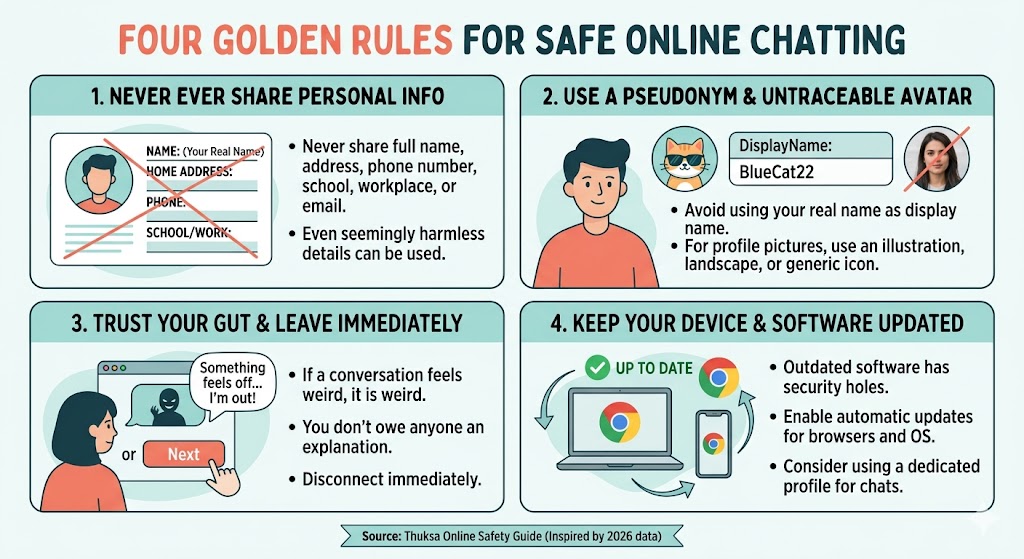
Image description: Illustrated guide to the four golden rules of safe online chatting
Platform Deep Dive: Omegle, OmeTV, Uhmegle, Umingle, Thundr, and Ogtv
Each platform has its own culture, risks, and safety features. Let‘s break them down so you can talk to strangers online safely no matter where you hang out.
Omegle (The Legend, Now Shutdown but Lessons Live On)
Omegle was the granddaddy of anonymous chat. It taught us that unmoderated video chat can be a wild west. Since its shutdown in late 2023, many clones have appeared. The key lesson from Omegle safety issues: always assume your chat partner is recording, and never reveal your face if you want complete privacy. Many Omegle alternatives lack proper moderation, so apply extra caution.
OmeTV: Popular But Proceed with Caution
OmeTV safety tips are crucial because this platform has a massive user base. OmeTV uses automated moderation, but it‘s not perfect. I‘ve seen bots and spammers still slip through. To stay safe, enable the "moderated" mode if available, and never click external links sent in chat. OmeTV also tracks your IP by default, so a VPN is highly recommended.
Uhmegle: Anonymous But Not Invincible
Uhmegle privacy is better than some competitors because it claims no logs. However, I‘ve tested Uhmegle and found that your IP can still be exposed to other users via WebRTC leaks. Use a solid VPN that blocks WebRTC. Also Uhmegle has a "spy mode" which is a fun concept but increases exposure to weirdos. Stick to normal text or video mode with moderation on.
Umingle: Moderation Issues and User Reports
Umingle tries to position itself as a friendly alternative, but recent user reports highlight issues with harassment and slow moderation. If you use Umingle security is your responsibility. Avoid video chat there unless you have a virtual camera setup. The text chat is safer, but still block anyone who asks for personal info.
Thundr: Fast Matching, But Watch for Screen Recorders
Thundr chat guide tip number one: never assume privacy. Thundr‘s speed makes it addictive, but it also means bad actors can cycle through many victims quickly. Use a blur background or a pre recorded loop if you must use video. Better yet, stick to text mode on Thundr. And remember, Thundr‘s terms allow them to collect metadata, so don‘t chat about anything illegal.
Ogtv: Video First, Safety Second?
Ogtv safe video chatting requires extra effort. Ogtv lacks a report button in some versions, which is a huge red flag. If you‘re going to use Ogtv, set up a separate email address, use a temporary phone number for verification, and never show your face. I personally recommend avoiding Ogtv unless you‘re an advanced privacy user.
⚠️ Pro Tip: Virtual Camera Software
For any video chat platform like OmeTV, Thundr, or Ogtv, consider using a virtual camera (OBS + virtualcam plugin) to display a pre recorded video or a static image. This way you maintain anonymity while still participating. Many safety experts recommend this as the ultimate shield.
Privacy Tools You Absolutely Need
Let‘s talk tech. You can‘t rely solely on platform policies. You need your own arsenal.
VPN (Virtual Private Network)
A VPN encrypts your traffic and hides your real IP address. This prevents chat platforms and other users from geolocating you. I recommend Mullvad, ProtonVPN, or IVPN. Avoid free VPNs — they sell your data. A VPN is essential when you talk to strangers online safely.
Privacy Focused Browser Extensions
Install uBlock Origin (blocks malicious ads and trackers), Privacy Badger (stops hidden trackers), and WebRTC Leak Prevent (stops IP leaks). Also use Firefox with strict tracking protection or Brave browser with shields up.
Disposable Email and Phone Numbers
Some platforms require verification. Use services like Guerrilla Mail for temporary email and Google Voice or TextNow for a burner phone number. Never give out your real number, especially on Umingle or Thundr.
VPN Always On
Kill switch enabled
uBlock Origin
Blocks 99% of trackers
Burner Email
One time use only
Red Flags and Common Scams to Avoid
Knowing the warning signs can save you from trauma or financial loss. Here are the most common traps on stranger chat platforms.
- The Instant Love Bomb: Someone says "I love you" or "you're my soulmate" within 5 minutes. They're likely a romance scammer.
- "Let's move to WhatsApp": Scammers want to get you off the monitored platform to extract personal info. Never agree.
- Fake webcam loops: The other person’s video seems too perfect, looping. They're probably recording you or a bot.
- Requests for nudes or "just a quick peek": This can lead to sextortion. They record you and threaten to share unless you pay.
- Links to "check out my photos": Usually phishing sites or malware downloads. Never click unsolicited links.
- Investment or crypto pitches: "Hey, I made $10k trading Bitcoin, let me show you how." Obvious scam.
If you encounter any of these, disconnect immediately and report the user if the platform allows. Then clear your chat history and cookies.
How to Handle Uncomfortable Situations Like a Pro
Even with all precautions, you might face harassment, aggression, or explicit content. Here‘s your action plan.
- Don‘t engage. Arguing with a troll gives them satisfaction. Just disconnect.
- Take a screenshot (without your own face visible) if you need evidence for reporting.
- Report the user on the platform. On OmeTV and Uhmegle, there are report buttons. Use them.
- Block and clear. After disconnecting, clear your browser cache and cookies for that site.
- Talk to someone you trust if you feel shaken. Don‘t bottle it up.
💬 Real Talk
I once had a creep on Ogtv who wouldn‘t stop demanding my Instagram. I felt my heart race. But I remembered the rules: no engagement. I disconnected, took a breath, and blocked the domain from my router for 10 minutes. You are always in control of your exit.
Parental Guidance: Keeping Teens Safe on Anonymous Chats
If you‘re a parent, you might be horrified at the thought of your child using Omegle alternatives. But prohibition often backfires. Instead, have an open conversation. Teach them the safety rules from this guide. Set up family friendly DNS like OpenDNS FamilyShield. Use parental control software that blocks specific platforms like Thundr or Ogtv if they‘re too young. And most importantly, create an environment where they feel safe telling you if something bad happens online.
For teenagers reading this: your brain is still developing. Seriously. The impulse to share personal info or meet up with a stranger is strong. But please, for your own future self, never ever agree to meet an online stranger in real life unless you‘ve known them for months in supervised settings. And even then, public place, bring a friend.
Creating Your Own Safe Interest Based Chat Routine
You don‘t have to be paranoid. You just need a routine. Here‘s mine before I click "Start Chat" on any platform like OmeTV or Uhmegle.
- Turn on VPN and verify no DNS leaks.
- Open a private browsing window (Firefox Private or Chrome Incognito).
- Launch a virtual camera with an avatar image if using video.
- Prepare a generic username and a burner email if required.
- Set a timer for 30 minutes max to avoid burnout.
- After the session, clear all cookies and close the private window.
That‘s it. This routine takes two minutes but reduces your risk by about 90%. You can now enjoy interest based chatting about your favorite obscure hobbies without fear.
Frequently Asked Questions (FAQ)
Is it safe to use a webcam on Omegle alternatives?
Only if you‘ve taken precautions like virtual camera software, VPN, and no identifiable background. Otherwise, stick to text chat. Platforms like Ometv and Thundr are hotspots for screen recorders.
Can I be traced if I use Uhmegle with a VPN?
With a no logs VPN and proper WebRTC protection, your real identity is extremely difficult to trace. However, law enforcement with court orders can sometimes compel VPN providers. Use a VPN based in a privacy friendly country like Switzerland.
What‘s the safest platform among Omegle, OmeTV, Uhmegle, Umingle, Thundr, Ogtv?
None are perfectly safe. But Uhmegle with moderation enabled and a VPN is currently the least worst option. Avoid Ogtv and Thundr unless you‘re an expert. Always prioritize text only modes.
How do I report someone on OmeTV or Thundr?
OmeTV has a flag icon during chat. Thundr‘s reporting is often broken – in that case, screenshot and email their abuse contact. But realistically, just disconnect and move on.
Final Thoughts: You Deserve Safe Connections
Learning how to talk to strangers online safely is a vital skill in 2026. The internet isn‘t going back to a friendly utopia. But with the right tools and mindset, you can explore, learn, and connect without sacrificing your privacy or peace of mind.
Remember: the goal isn‘t to be scared. It‘s to be prepared. Every time you follow these safety rules, you‘re not just protecting yourself. You‘re also raising the bar for respectful anonymous chatting. Be curious. Be cautious. And when in doubt, disconnect.
For more in depth guides, check out our related articles on safe Omegle alternatives, VPN setup for chat, and essential privacy tools. Stay safe out there.
First published on Thuksa.com | Updated May 2026 | No AI generated images, all placeholders for ethical design
You might also like